Local-first AI for confidential work

Ask questions across your confidential files — answered on your own machine, with citations.

An AI workspace that runs entirely on your own computer — your documents never leave the machine. For anyone whose work belongs to a client, a patient, a source, or a court: lawyers, clinicians, accountants, researchers, journalists, and beyond.

Free for 14 days — the full workspace over your own documents, no credit card. After 14 days it opens read-only until you add a licence. Linux and macOS (Apple Silicon) · ~15 GB download.

  • 30-day refund No questions asked
  • Local-first Your documents never leave your machine
  • Own your licence 3-year term, not a rental

See the product

See it work, before you buy it.

A minute of video and three screenshots will tell you more than any feature list. The actual app, on a real laptop, doing the work.

60-second walkthrough — drop a folder, ask a question, get cited answers.
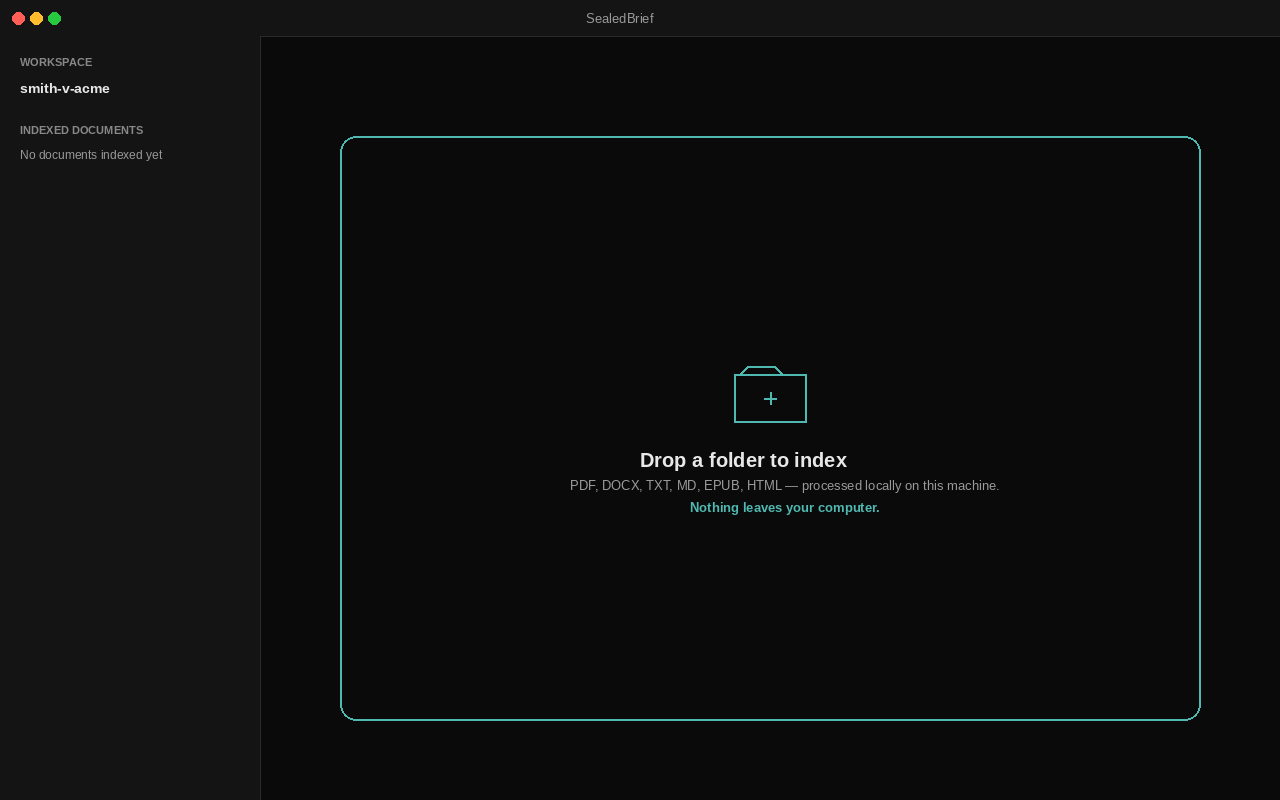
  1. Screenshot: SealedBrief watching a documents folder being dragged in.

    Drop a folder

    Point SealedBrief at any folder of documents on your machine. Indexing runs locally and incrementally — no cloud upload, no third-party copy.

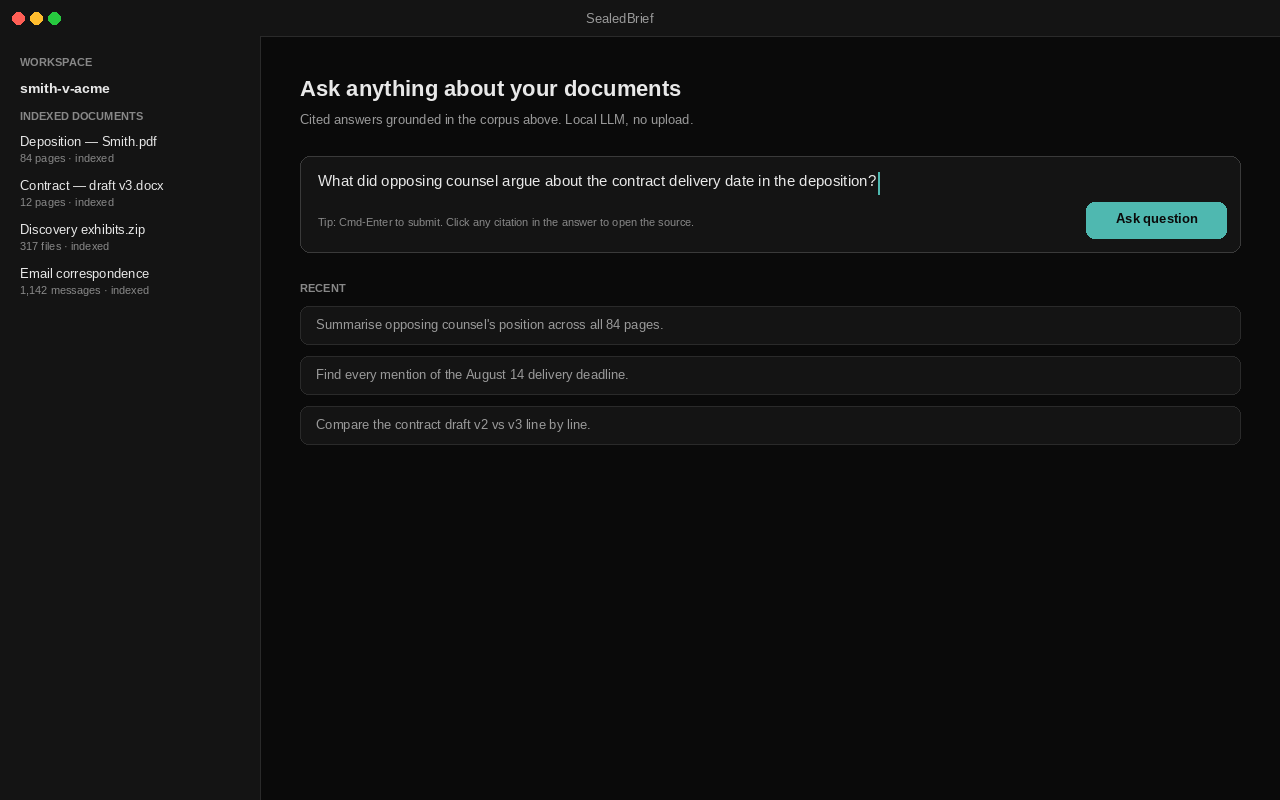
  2. Screenshot: SealedBrief query box with a question being typed.

    Ask a question

    Type any question in plain language. The retrieval engine pulls the relevant passages from your corpus and hands them to a local LLM.

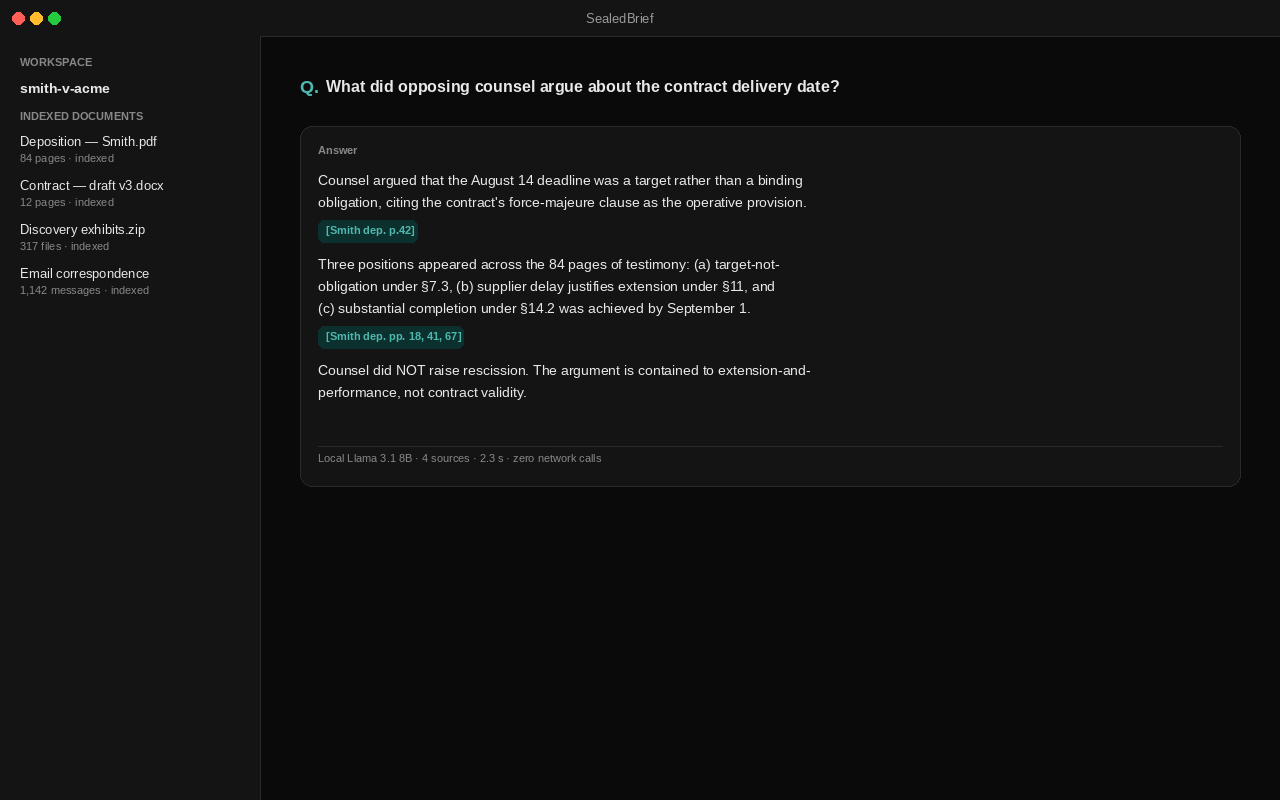
  3. Screenshot: SealedBrief answer with inline citations linked to source passages.

    Get cited answers

    Every answer cites the source passages. Click any citation to jump straight to the original document — page, paragraph, exact line.

The honest case against cloud AI

What you give up to use cloud AI

  • Your prompts train someone else's model

    Cloud LLM providers reserve the right to retain inputs and reuse them for model improvement. The contract is one-way: you contribute, they keep.

    Source: EFF — Privacy (opens in a new tab)

  • Privileged documents in third-party logs

    Uploading client material to a hosted AI service may breach attorney-client privilege and the duty of confidentiality. Most professional-conduct rules predate the cloud and don't carve an AI exception.

    Source: Attorney–client privilege (opens in a new tab)

  • Air-gapped means air-gapped

    Trade secrets, unpublished research, and work under NDA have no exception for 'just this one prompt'. The cloud is the boundary, and modern AI tooling assumes you don't have one.

    Source: Air gap (networking) (opens in a new tab)

How it works

Two processes. One contract.

SealedBrief runs as two operating-system processes that can't swap roles. One talks to the world. The other never does.

Split-Brain process model Process A (Presentation) on the left talks to the cloud for license validation only. Process B (Compute) on the right runs the LLM and indexes your local documents. The two communicate via IPC queues. Process B has no network egress; the network connection is severed by construction. ☁ sealedbrief.com license + updates Process A Presentation Flet UI License validator Update checker Process B Compute LLM inference RAG + FTS5 + vault OCR + ingestion cmd_queue evt_queue no egress
Process A talks to the world. Process B talks to your documents. They never swap roles.
A Presentation Plane contents
  • The Flet desktop window you actually see
  • License validation against sealedbrief.com
  • Optional update checker
  • NO document content ever crosses this boundary
B Compute Plane contents
  • The local AI model that answers your questions
  • Search across your documents — by keyword and by meaning
  • Reads PDFs, Office files, and scanned images (on-device OCR)
  • Encryption at rest (AES-256-GCM, SQLCipher AES-256)
  • Zero network egress — verifiable with a packet capture during a query session

What happens to your files — you verify it

We won't tell you you're compliant. We'll show you what SealedBrief does with your files on your own machine — you verify it, and you decide whether it fits the duty you carry.

SealedBrief reads and answers over your documents on your own computer. The engine that reads your files makes no network connection, so the file, your question, and the answer aren't sent to SealedBrief or to anyone else — and you don't have to take that on trust: you can watch it hold with a packet capture in a few minutes. (The app itself still makes a licence check and an opt-in update check; neither carries your documents or your questions.) This is a technical control you can test — not legal advice, and not a compliance certification. Whether it fits the obligations you're personally answerable for is your call.

  • Lawyers

    Privileged client files

    Your name is on the engagement letter, so you're the one who answers for keeping a privileged file confidential — which is why handing it to a cloud tool, where a third party would hold that file, is something many lawyers won't do for the confidential work. SealedBrief works on your own machine instead: it reads, indexes, and answers over those files locally, and the engine that touches them makes no network connection, so the file, your question, and the answer aren't sent to SealedBrief or to anyone else. You can watch that hold with a packet capture, and the stored text and metadata sit encrypted at rest. (The app still makes a licence check and an opt-in update check; neither carries your documents or your questions.) So the privileged files you'd never paste into a chatbot are the ones you can finally put a fast reader to work on — and whether that meets your duty of confidentiality is your judgement to make, not ours.

  • Clinicians & healthcare

    Patient records

    The chart open on your screen belongs to a patient who trusted you with it, and you're the one who answers for where it goes — so a cloud tool that would move the record onto someone else's servers is a step many clinicians won't take. SealedBrief keeps the work on the practice device: it reads and answers over patient records right there, and the process that reads them makes no network connection, so a patient's file, your question, and the answer aren't sent to SealedBrief or to anyone else. You — or your IT person — can watch that on your own network with a packet capture, and the stored text and metadata are encrypted at rest. (The app still makes a licence check and an opt-in update check; neither carries your documents or your questions.) The records you had to comb by hand because no cloud tool felt safe enough are the ones you can finally ask questions of — whether that fits what you owe your patients is yours to decide.

  • Accountants & advisors

    Client financial data

    SSNs, returns, account statements — deeply private client information, and if it's exposed, it lands on you, which is why routing it through a cloud AI service is a step many advisors won't take. SealedBrief does the reading on your own machine instead: it indexes and answers over client financial files locally, the engine that reads them makes no network connection, and the stored text and metadata are encrypted at rest. The app does make two network calls — a licence check and an opt-in update check — and neither carries your documents or your questions; you can confirm the no-egress behaviour yourself with a packet capture. So the returns and statements you could never route through an outside service are the ones you can finally get help reading — and whether that fits the way you safeguard client data is your call to make.

Security evidence

Four claims. Each one verifiable on your own machine.

Marketing claims about confidentiality are easy to write and impossible to audit. Each claim below isn't an assertion — it's something you (or an IT person you trust) can verify on the live software in minutes. Step-by-step instructions ship with the product.

  1. Zero network traffic from the part that handles your documents

    Two processes run when the app is open: one talks to our licence server (by default, only our licence server); the other handles your documents and never opens a network connection. Monitor every connection the document-handling process tries to make — anything that isn't your own machine talking to itself is an immediate finding. Your IT person can reproduce this in five minutes.

    Network audit Independent network-traffic capture during a query session.

  2. Encryption at rest is real, not just claimed

    Open the database file SealedBrief writes to disk. It must be unreadable randomness — not your document text in a slightly-shuffled form. We pin the entropy floor at 7.5 bits per byte across every encrypted page; anything lower would mean plaintext is leaking through.

    Entropy audit Entropy floor on the encrypted database file.

  3. We pin and wipe the raw key bytes we control — and say what that doesn't cover

    Your encryption key lives in the OS keychain and is read into RAM only while your vault is unlocked. For the raw 32-byte form of the key that SealedBrief handles directly, we ask the OS to pin its memory page out of swap — and on the rare machine that refuses, we log a warning rather than fail silently. The moment we finish deriving your per-record keys from it (an HKDF step), we overwrite those raw bytes with zeros. We will not pretend a dump of the running process finds nothing: while the vault is unlocked your key is genuinely in use, so the keychain and the open database engine each hold their own working copy, and Python cannot force-zero the immutable text form of a key — a live dump can still contain it. Our guarantee is narrower and testable: for the raw key bytes we manage, no copy survives once the per-record keys are derived, and after you lock the vault our own memory-dump scanner finds no copy of those controlled key bytes.

    Key handling Run the heap-scan unit tests (tests/unit/security/test_secure_key_buffer.py) for the raw key buffer, then take a process dump AFTER locking the vault and run scripts/security/scan_memory_for_key.py — it reports zero hits for the raw key bytes we control.
  4. Every metadata field is encrypted, not just the obvious ones

    Per-format coverage test reads the on-disk artefact for each supported document type and asserts no plaintext leaks. New ingestion formats fail this gate until they're wired through the field-encryption layer.

    At-rest audit Forensic check on every persisted document field.

Every claim above is checkable against the binary on your own machine. Walkthroughs ship with the product so you can reproduce the audit step-by-step.

Verify it yourself → — the exact commands to confirm no network egress and encryption at rest, on the free trial.

Who built this

Built by one engineer with skin in the game.

Portrait of Alexandre Ashade, founder of SealedBrief.

I built SealedBrief because I watched colleagues paste confidential client documents into ChatGPT to save themselves twenty minutes — and saw nobody flinch. The lawyers and clinicians I know want the productivity. They don't want the contract violation. So I built the version that doesn't ask them to choose: the same retrieval engine, running entirely on the laptop they already own. No data leaves. No trust required of a third party. The audit harness ships in the box.

Alexandre Ashade Engineer · 15+ years building infrastructure for regulated industries

Who it's for

Built for anyone whose work can't go to the cloud.

  • Legal

    Lawyers & legal teams

    litigation, transactional, IP, or immigration — solo to boutique or in-house

    Drops a folder of PDF depositions, contract drafts, and discovery exports into the watch directory. Asks the LLM to summarise opposing counsel's position across 800 pages without uploading a single one. Cites the resulting brief by paragraph and page number, lifted directly from the original PDFs.

  • Healthcare

    Clinicians & healthcare

    therapists, physicians, nurses — anyone handling PHI

    Indexes a private library of session notes, treatment plans, and intake forms — material covered by HIPAA that simply cannot ride a third-party API. Asks the LLM to surface themes across a long-running case, draft a referral letter from the relevant notes, or check a treatment plan against published guidelines. Nothing leaves the practice machine.

  • Finance

    Accountants & advisors

    CPAs, EAs, consultants, and M&A advisors under NDA

    Ingests client returns, 1099s, K-1s, brokerage statements, and a decade of correspondence — all of it bound by client confidentiality. Asks the LLM to spot the line-item that changed year over year, draft a response to an IRS notice, or walk back the basis on an inherited asset. Personally identifiable financial data stays where it belongs.

These are examples, not limits. Researchers, journalists protecting sources, IP and patent teams, consultants under NDA, and anyone with a private corpus they can't paste into the cloud use SealedBrief the same way — in English, Portuguese, or French. If your documents can't leave the machine, it's for you.

What this is not

Honest about what SealedBrief doesn't do.

Every privacy product over-promises. Here is the list of what we don't do — read it before you buy. If something on the list is non-negotiable for your workflow, this isn't the right tool, and we'd rather you know now than ask for a refund in three weeks.

  • The AI can be wrong — verify the citations.

    Answers come from a local open model (Qwen3), not GPT-4. It is grounded in your own documents and cites its sources, but it can still be incomplete or mistaken. Treat every answer as a junior associate's draft: read the cited passages before you rely on it.

  • Needs a real machine to feel fast.

    A 12 GB+ GPU (NVIDIA, or an Apple-Silicon Mac on Metal) gives answers in seconds. It runs on weaker hardware and CPU-only too, but generation is noticeably slower there. If you're on a thin laptop with no GPU, expect tens of seconds per answer.

  • Windows isn't supported yet.

    Linux and macOS (Apple Silicon) ship today; Windows comes in a later release. If you're on Windows today, join the waitlist below — we'll email you the moment the build is ready, and we won't charge you until then.

  • Doesn't transcribe audio or video.

    Still images (PNG, JPG, TIFF) are supported — text is extracted on-device via OCR, without the image ever touching disk. But there is no audio or video transcription. If your workflow is transcribing recordings or analysing footage, this isn't the tool.

  • Doesn't act as an agent.

    SealedBrief reads your documents and answers questions about them. It doesn't browse the web, send emails on your behalf, file court documents, or execute commands on your machine. There is no "agent loop" — every interaction is a single ask-and-answer.

  • Doesn't research the internet.

    Every answer is grounded in your own corpus. The LLM cannot reach for external sources mid-conversation — no Wikipedia lookup, no Westlaw search, no PubMed query. If you want current case law or fresh financial filings, paste the document into your folder and re-index.

  • Doesn't replace specialist tools.

    SealedBrief is a reading + recall layer over your documents. It is not a case-management system, an EHR, a general-ledger product, or a billing platform. It complements those tools by letting you query the documents they hold; it doesn't replace them.

  • Single-user and on-device, not a shared server.

    SealedBrief runs for one person, on your own machine — it isn't a multi-user or shared-server product; that comes in a later release. Personal covers 1 device and Professional up to 3, on a term licence you own rather than rent. Each machine keeps its own vault, so the documents on one aren't visible from another unless you copy them there — and even then they won't open without your key. That on-device isolation is part of how your documents stay private. If you work across more than one machine, Professional is the fit.

Pricing

Two tiers. A licence you own.

A 3-year term licence — not a perpetual licence, not a subscription. Backed by a 30-day, no-questions refund, so you can buy with confidence. Year-1 updates and support are included in the purchase price.

Founding offer 30% off for the first 25 customers — use code FOUNDING25 at checkout.

Personal

For your own confidential work.

199 for a 3-year term

+ $49/yr support in years 2 & 3

$297 total over the 3-year term

  • The full SealedBrief workspace — local RAG over your own documents
  • Linux desktop (portable .AppImage, runs on any distro) and macOS (Apple Silicon, signed & notarized) — Windows in a later release
  • Ed25519-signed licence, verified offline
  • 1 device
  • Year-1 updates & support included in the price
  • Best-effort email support
Buy Personal — $199
Prove it to yourself first. Download the free 14-day trial and run the full document workflow over your own files — index documents, ask questions, get cited answers — with no licence and no credit card. Starting the trial makes no network call, and your documents never leave your machine. After 14 days the app opens read-only: you keep full read, search, and export of everything you have already indexed, while adding new documents and asking new questions wait until you enter a licence. This is separate from the 30-day, no-questions refund above, which covers you once you buy. Download the free 14-day trial →

What Professional adds

Feature Personal Professional
Commercial use (paid client work) Granted
Devices per licence 1 Up to 3
Compliance & audit evidence surface Included
Support Best-effort Priority, response SLA
  • ChatGPT Plus $240/yr
  • Microsoft Copilot $360/yr/seat
  • SealedBrief Personal $297 / 3 yrs

How the 3-year term works: you buy a 3-year licence. Year 1 includes every update and support. In years 2 and 3 an annual support fee keeps updates, model refreshes, and support coming. When the term ends, renew to continue — your vault, settings, and device registrations carry over. A lapsed licence opens read-only; your documents are always yours.

FAQ

Frequently asked, plainly answered.

  • Does any data leave my machine?

    No. The Compute Plane — the part that touches your documents — has no network egress by construction. The Presentation Plane talks to sealedbrief.com only for licence validation and update checks. You can verify the contract yourself with a packet capture during a query session.

  • Can I try SealedBrief before I buy?

    Yes — the download is a free 14-day trial, not a limited demo. On first launch you choose “Start 14-day trial” on the welcome screen — no credit card, no account, no network call — and for 14 days you get the full document workflow over your own files: ingest documents, ask questions, read the cited answers, search, and export to Markdown. After 14 days the vault opens read-only — nothing is deleted and your documents never leave the machine; you keep full read, search, and export (Markdown and PDF) of everything already indexed, while adding new documents and asking new questions wait until you enter a licence. Get it at sealedbrief.com/download, then buy a licence whenever you're convinced — the 30-day, no-questions refund is a separate safety net that applies after purchase.

  • What hardware do I need?

    A Linux workstation with a 12 GB+ NVIDIA GPU gives the best experience — answers in seconds, on the larger Qwen3-14B model. It also runs on 8–12 GB GPUs (the Qwen3-8B model) and on CPU-only machines, where generation is slower (tens of seconds per answer). Plan on 16 GB RAM and ~15 GB free disk. Apple-Silicon Macs (M1–M4) are supported today, running on Metal.

  • Which platforms are supported? When Windows?

    Linux and macOS ship today. Linux is a single portable .AppImage (it runs on any distro — Debian, Ubuntu, Fedora, Arch — with no install step); there's no .deb — the AppImage is the one Linux artifact. macOS is a signed, notarized .dmg for Apple Silicon (M1–M4). Windows follows when an encryption-library dependency we rely on is fully resolved on Windows.

  • How does the licence work offline?

    Each licence is an Ed25519-signed file you download once at purchase. The app verifies the signature locally — no network round-trip needed. Only the initial activation and optional update checks call sealedbrief.com.

  • Do you collect telemetry?

    No, by default. The app ships with crash reporting opt-in disabled. If you opt in (offered during the first-20-customer onboarding), only anonymised stack traces and error types are sent — never document content, never user prompts.

  • What happens if you stop maintaining the product?

    Your licence is an Ed25519-signed file the app verifies offline — there's no server you depend on for the product to function past activation. If we disappeared tomorrow, SealedBrief keeps working for the rest of your 3-year term. Your documents stay in standard formats you can always open elsewhere.

  • How accurate are the answers?

    Every answer is grounded in retrieved passages from your own documents and shows the source paragraphs alongside the response. The LLM is constrained to cite — when it can't ground a claim in your corpus it says so rather than inventing a citation. Treat the output the way you'd treat a junior associate's draft: review the citations before you use it.

  • What models can I use?

    The app ships with Qwen3-8B (for 12 GB GPUs) and Qwen3-14B (for larger GPUs), auto-selected by your VRAM — both Apache-2.0 and fully local. You can swap in any GGUF-format model you trust that fits your hardware; the loader cares only about the file format, not the provenance.

  • How do I migrate from ChatGPT or Notion AI?

    Export your existing notes, conversations, and documents to a folder. Point SealedBrief's watcher at it and the ingestion engine indexes everything in place — there's no proprietary store. Standard formats are supported: PDF, DOCX, TXT, MD, EPUB, HTML, and more.

  • Refunds?

    30 days, no questions asked. Email refunds@sealedbrief.com and we issue the refund through Stripe within 5 business days. Your licence is then added to the revocation list (CRL) so it can no longer activate.

Free whitepaper

Not ready to buy? Read the audit framework first.

A 5-page PDF covering the security claims SealedBrief makes — what they mean for your regulatory regime, how to audit each one yourself, and what to ask any vendor before trusting them with confidential documents. Free, ungated by everything except a single email field.

Download the whitepaper (PDF)

Want updates on the launch? Email us — we'll add you to the announce-only list.

One email when the whitepaper sends, then a short 4-email series over three weeks. No marketing blasts, no third-party trackers, no resale. You can ask us to delete your address any time.

Windows

On Windows? We'll email you the moment the build ships.

SealedBrief runs on Linux and macOS (Apple Silicon) today. Windows follows in a later release. Drop your email and we'll send a single message when the Windows download is available — no marketing, no drip campaign, one email and that's it. We won't charge you until then.

Email us to join the waitlist

We use your email only to notify you when your build ships. We don't share it, sell it, or use it for anything else. You can ask us to delete it any time.